- Strict modes stop you from changing the rules.
- Cross-device blocking closes backup escape routes.
- Physical blockers add real-world friction.
- One Goal encourages intentional phone use.
- Good blockers protect you without punishing you.
- Fewer loopholes mean fewer scrolling spirals.
Normal app limits fail fast because they are too polite. You hit your daily limit, see the warning, then tap “ignore” like it is a reflex. That is where screen time lock software with no password cheat becomes useful.
“No password cheat” means the lock cannot be escaped with a quick code, a settings change, or app deletion. It creates real friction, so you pause before autopilot takes over again. Let’s dive deeper into this.

Best No-Cheat Screen Time Lock Tools in 2026
The best tools in 2026 focus less on willpower and more on enforced friction. They do not just remind you to stop scrolling. They make cheating annoying, slow, or impossible.
Good screen time lock software with no password cheat protects you from autopilot, not just bad intentions.
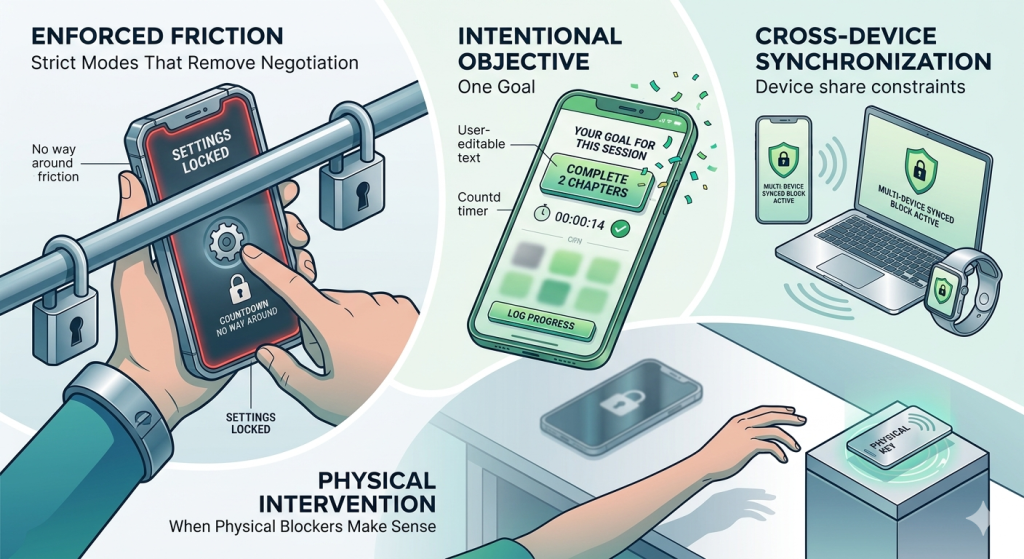
Strict Modes That Remove Negotiation
In strict mode, once you activate the screen time tools, you cannot easily change the rules, delete the app, or edit your block list.
AppBlock is a strong example here:
- Its strict mode can stop you from changing schedules or uninstalling the blocker during a weak moment.
- On Android, it can also target specific app features, like Shorts or Reels.
The magic is in removing negotiation. Once the block starts, you cannot talk your way out immediately.
One Goal for Intentional Phone Use
One Goal: Locked In takes a more intentional approach to screen time control. Instead of only blocking apps, it asks you to choose one clear goal for each focus session. That means no multitasking, no random checking, and fewer “how did I get here?” moments.
- You can set a countdown timer when you want a fixed focus sprint. You can also use open-ended mode when you want to stay in flow without watching the clock. Either way, the app helps you stay connected to what you actually planned to do.
- When you reach for distracting apps, One Goal reminds you to stay on track. That small interruption can be enough to break the autopilot loop before it becomes another scroll spiral.
- It also makes focus feel less miserable. The app includes motivational quotes, milestone celebrations, streak tracking, session history, and a confetti celebration when you finish.
This makes One Goal a good fit if you want screen time lock software with no password cheat, but dislike cold, punishing blockers. It adds friction, but keeps the experience goal-based and encouraging.
Cross-Device Blocking for Serious Focus
Of course, your phone is not the only escape hatch. You can block Instagram on your phone, then magically appear on your laptop. Your brain deserves points for creativity, but not too many.
Freedom is helpful because it works across devices.
- You can block distracting sites and apps on your phone, tablet, and computer at the same time.
- This matters for serious focus sessions: studying, writing, working, or sleeping.
Cross-device blocking is especially useful if your distractions follow you everywhere.
When Physical Blockers Make Sense
For some people, software still feels too easy to fight. That is where physical blockers come in.
NFC blockers use a physical tag, card, or device to control access:
- You tap it to lock or unlock certain apps. T
- hen you place it somewhere inconvenient, like another room.
To cheat, you must stand up, walk over, and scan the object. By the time you reach the blocker, you may remember your actual plan.
How to Build a Zero-Cheat Phone Setup
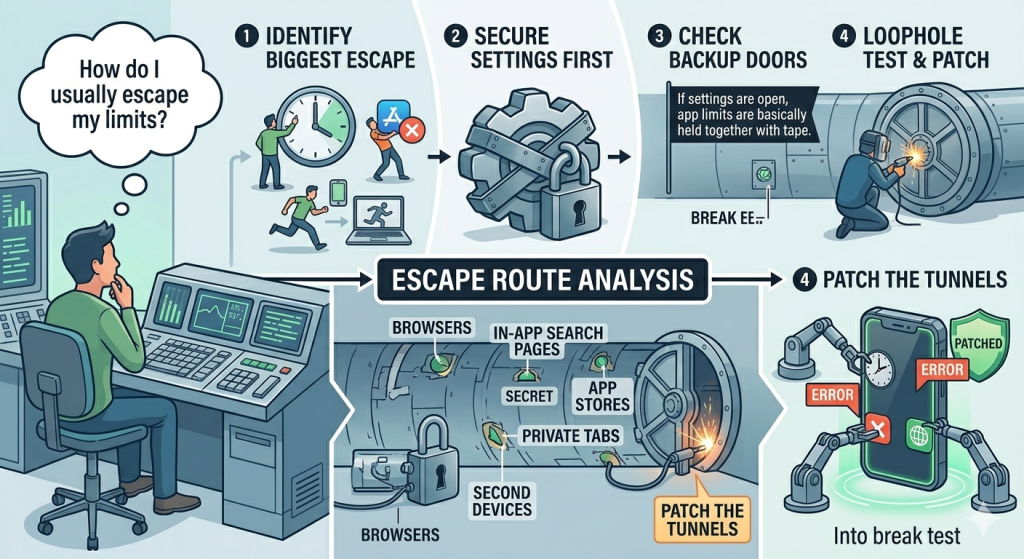
Before choosing tools, ask yourself one question: “How do I usually escape my limits?”
- Start with your biggest escape route first. If you usually change time settings, lock those settings down. If you delete apps, use a blocker with uninstall protection. If you run to your laptop, block distractions there, too.
- Next, lock the settings before you lock the apps. This sounds boring, but it matters. If your settings are open, your app limits are basically held together with tape.
- Then check your backup doors. Browsers, in-app search pages, app stores, private tabs, and second devices can all become escape tunnels.
- Test your setup. Try to break it. Try changing the time. Try deleting the blocker. Try opening YouTube through another app. Try using a browser shortcut. If you find a loophole, patch it.
Conclusion
If your current app limits are easy to ignore, delete, or outsmart, you need better friction. The best screen time lock software with no password cheat helps you stop relying on willpower and start building a setup that protects your focus.
With stricter blockers, intentional tools like One Goal, cross-device limits, and even physical friction, you can close the little escape routes that keep pulling you back in.
People Also Want to Know
What is screen time lock software with no password cheat?
It is software that makes app limits harder to bypass with a password, settings change, or quick uninstall. Instead of trusting willpower, it adds stronger friction so you cannot escape your own limits during weak moments.
Why do normal screen time limits fail so easily?
Normal screen time limits often fail because they are too easy to dismiss. If you can tap “ignore limit,” change the device time, or delete the blocker, your tired brain will probably find the escape route eventually.
Can screen time lock software stop doomscrolling?
It can help by interrupting the automatic habit loop. Good blockers do not fix boredom or stress alone, but they make mindless scrolling harder to start, giving you a pause before another long scroll session begins.
What is the best way to make app limits harder to cheat?
Start by blocking your biggest escape route. Use strict mode, uninstall protection, cross-device blocking, or physical friction. The best setup protects you when motivation is low, not only when you feel disciplined.