
- It shows others your notifications are silenced
- It helps during work, study, rest, and family time
- It works best in Apple Messages app
- It is not the same as blocking messages
If you have seen this setting on your iPhone, you may wonder, what is focus status exactly. It is a small signal your iPhone can share with other people when you have a Focus mode turned on.
This can be useful during work, study, rest, or even while enjoying dinner without your phone buzzing beside you.
How to Activate Focus Status on iPhone
- Open Settings on your iPhone.
- Scroll down and tap Focus, then tap Focus Status.
- From there, turn on Share Focus Status.
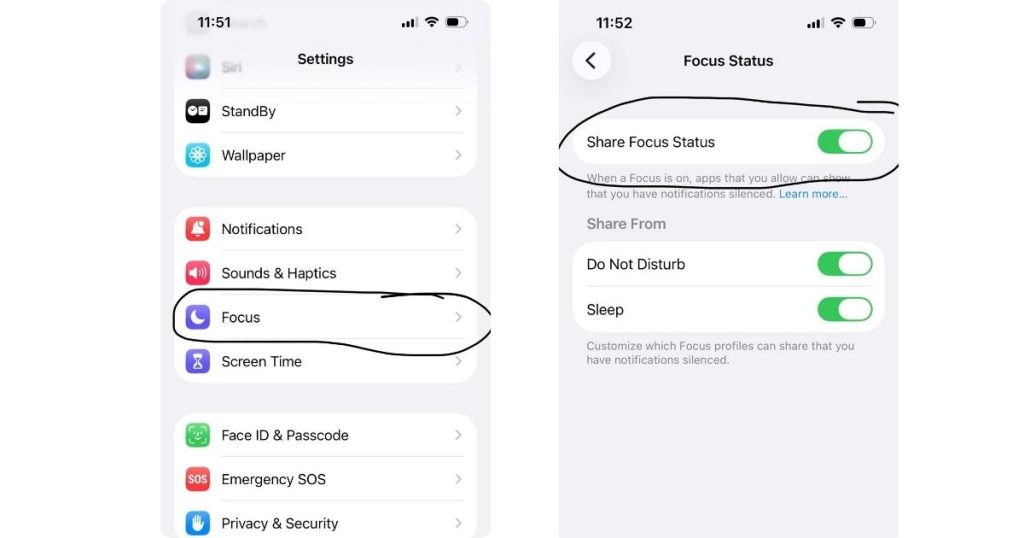
Apple notes that when Focus Status is on, people who try to contact you may see that your notifications are silenced, especially in apps like Messages.
If you are still asking what is focus status, it is not the same as blocking messages. It is simply a way to share that your phone is limiting interruptions.
One Extra Setting That Helps It Work Properly
Share Across Devices needs to be turned on if you want to share Focus Status. You can find that in Settings > Focus as well. When this setting is enabled, your Focus settings can stay in sync across your Apple devices signed in to the same Apple Account.
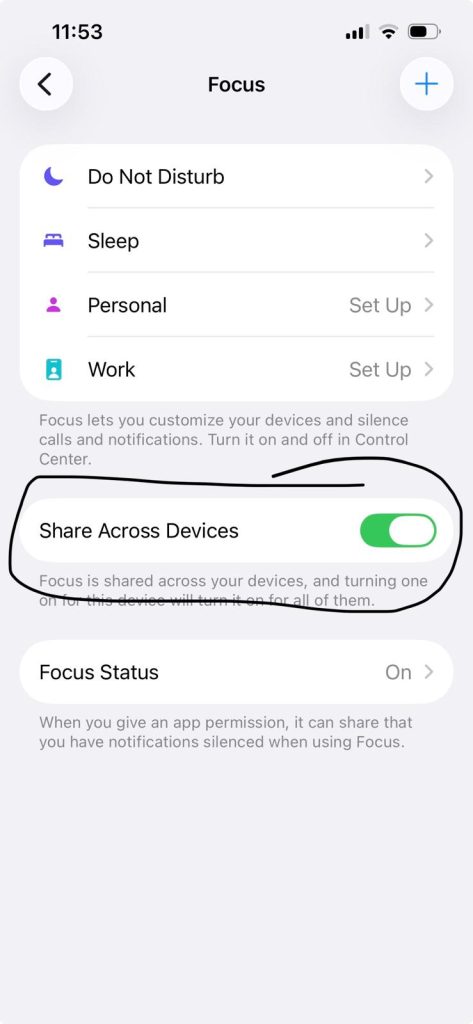
Once everything is on, activate a Focus mode like Do Not Disturb, Work, or Sleep, and your Focus Status can start showing in supported apps.
How Focus Status Connects With Messages
Focus Status mainly works with Apple’s own apps, especially Messages. It appears automatically when your Focus mode is active and sharing is enabled.
Some third-party apps can also work with Focus, but not all of them handle it the same way. In many cases, the effect is less about showing your status and more about managing notifications. That means the app may stay quiet on your side, even if other people do not see a status message.
Why Makes the Feature So Useful
The real charm of Focus Status is how it helps messages and apps feel less demanding. You still get to decide when to respond. At the same time, other people get a gentle clue that you may be busy.
In simple terms, what is focus status really about? It is a small feature that helps messages and apps respect your time.
When to use Focus Status:
- While you are working. This feature helps you protect that block of time without making it look like you vanished.
- During rest, family time, and evenings. It is helpful when you want to be more present in your personal life.
- When you want better boundaries without overexplaining. Instead of sending messages like, “Sorry, I am busy,” again and again, your iPhone handles the hint for you.
What Focus Stat Is Not
If you are still wondering what is focus status, it’s important to mention that it only shares that your notifications are currently being limited. Here’s what it doesn’t do:
- It does not tell people what you are doing: when Focus Status is on, it usually only shows that your notifications are silenced. That is all. It does not tell someone whether you are sleeping, working, reading, or hiding from your group chat. Your privacy stays intact.
- It is not the same as blocking messages: it does not work like a block button. People can still send you messages, but help them understand that you may not answer right away.
The Difference Between Focus Mode and Focus Status
These two features sound almost identical, which is why people mix them up all the time.
- Focus Mode is the full system that helps you manage interruptions. It lets you silence notifications, allow certain people or apps through, and even customize different modes like Work, Personal, Sleep, or Driving.
- Focus Status is just one part of that bigger setup. It tells people that your notifications are silenced when a Focus is on. Contacts may see that you have “notifications silenced,” but they do not see which specific Focus you are using.
So, if you are wondering what is focus status, think of it as the visible side of Focus Mode. One manages your phone experience, the other helps explain your delayed replies without making you type the same excuse all day.
How Focus Status Supports Better Concentration
Focus Status helps concentration by reducing the social pressure that comes with every incoming message. When people can see that your notifications are silenced, there is less expectation for an instant reply.
Apple describes Focus as a feature that helps you concentrate by minimizing distractions and letting other people and apps know you are busy.
In conclusion, what is focus status most useful for? It is a simple tool that works best when you use it on purpose. A little setup, a little consistency, and suddenly your phone starts acting more like a helpful assistant and less like a needy roommate.
FAQs
1. What does focus status on iPhone mean?
Focus Status on iPhone means your device can show others that your notifications are silenced while a Focus mode is on. It helps set expectations without sharing private details, so people know you may not reply straight away.
2. What happens to texts when Focus is on?
When Focus is on, your texts still arrive, but notifications may be silenced. In supported apps like Messages, others may see that your notifications are silenced. They can still text you, and in some cases, choose to notify you anyway.
3. Can others see my focus status?
Yes, others can see your Focus Status if you choose to share it. They may see that your notifications are silenced, but they cannot see which Focus mode you are using or what you are doing.
4. What happens when you turn off focus status?
When you turn off Focus Status, apps stop showing others that your notifications are silenced. People can still message you, but they will no longer see that status message, and they will not know a Focus is active from that signal.